Malicious links on Google searches could be dangerous, security group says


CHICAGO (WLS) -- When you search for a business or service on a web browser, you may click on the first link that pops up.
But one security group says some links could be dangerous.
ABC7 Chicago is now streaming 24/7. Click here to watch
Search "results" could lead you to fake links that can steal your money and personal information.
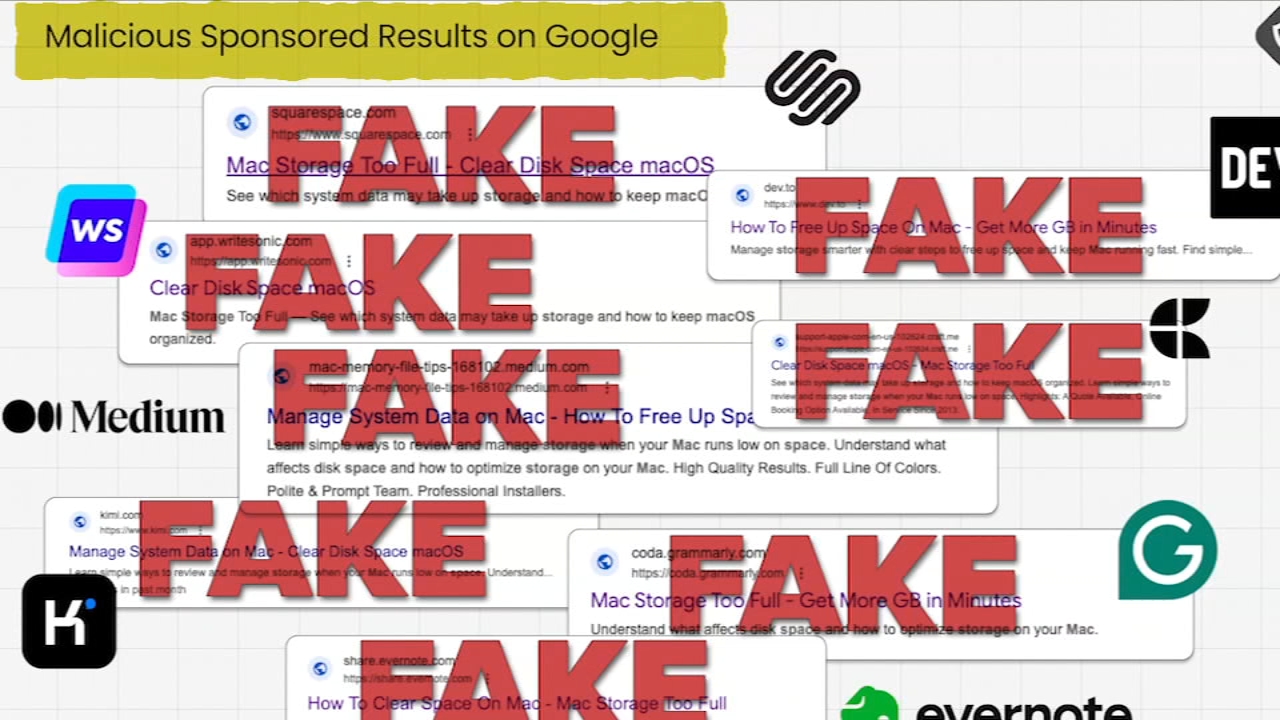
Guardio gave several examples of what the security group calls malicious "sponsored" results on Google.
"They are doing a lot of damage, and people need to make sure they are not clicking on the results immediately," Guardio Head of Research Nati Tal said.
There is a fake Claude website and others targeting people looking for computer help.
"You're searching for something quickly; you click on the first option. We trust Google," Tal said.
Experts say scammers are running Google search ads targeting specific keywords, causing some sponsored results to appear first when users search for phrases, like "how to check free space on Mac" or "sound not working on Mac."
RELATED: Quick Tip: Fake travel websites
"You are looking to fix your storage issue on your Mac, and you search for it, and get the first result, and you click on it. You get the page that looks like Apple support, the logo and everything. But it's actually a fake website," Tal said.
Then the fraud website tells you to copy a command to clipboard and paste, then press enter. But if you do that, you might be giving scammers access.
"The command downloads malicious software to your computer, executes it, scans your entire life on computer and sends everything all back to the attacker," Tal said.
Google says keeping users safe is its top priority.
A Google spokesperson told the I-Team "Malware has no place on our platforms, and we've suspended these advertiser accounts for violating our policies."
Google added that scammers use ever-changing techniques to try to game their systems, but the company invests in enforcing the rules with a team of thousands working around the clock.
"Many people fall for that, and we need to make sure we are not clicking on just any results on Google," Tal said.
Sponsored results usually come up first; so look at those closely. And read the full website address.
If you are searching for a website you already know, avoid those "sponsored results" and type the full domain address in yourself.
You can also report bad advertisements.
Click here for more information from Google.